Callouts
Written By Manos Mastorakis
Last updated About 1 month ago
Callout blocks allow you to visually highlight important information inside your notes and pages. They help structure documents, draw attention to key ideas, and make content easier to read and scan — especially useful in shared team pages and meeting documentation.
✍️ What Callout blocks do
Callout blocks let you:
Emphasize important information inside any note or page
Visually separate key ideas from regular text
Improve readability and scannability of long documents
Signal intent clearly to anyone reading the note (info, idea, warning)
Nest text, lists, and other content inside the callout block
They work seamlessly with Routine's full note editor and support all standard formatting inside the block.
➕ How to insert a Callout block
Open any note, page, journal entry, or object with a notes property
Hit
/at the beginning of a new lineType "callout" and select the block type from the menu
Choose your preset (Info, Idea, or Alert)
Start typing inside the callout
You can also use the + button on any block handle to insert a callout block directly above or below the current block.
🎨 Available callout types
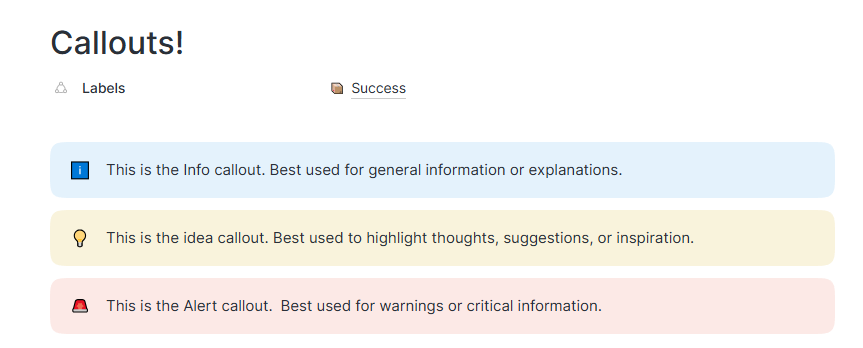
Routine offers three callout presets designed to cover the most common use cases:
Info — for general information, context, or explanations. Displayed with an info emoji and a blue background.
Idea — for thoughts, suggestions, or inspiration. Displayed with a lightbulb emoji and a yellow background.
Alert — for warnings, critical information, or important notices. Displayed with an alert emoji and a red background.
🍮 Customizing callout blocks
Change the emoji icon to match the tone or context of your callout
Background colors are fixed per preset to maintain visual consistency across documents
Content inside a callout supports full formatting — bold, italic, links, inline code, and more
Lists and nested text can be added inside a callout block
ℹ️ Why Callout blocks matter
Callout blocks:
Make documents clearer and more engaging at a glance
Help readers quickly identify the most important sections
Signal the nature of information immediately (context vs. warning vs. idea)
Improve shared documentation by making intent explicit
Keep long notes organized without requiring additional headings
🗣️ Use cases
Callout blocks are especially useful for:
Meeting notes — highlight decisions, blockers, or key takeaways
Project documentation — call out important constraints, deadlines, or dependencies
Team pages — make shared content easier to navigate and understand
Onboarding docs — use Alert blocks to flag critical steps or warnings
Personal planning — highlight the most important priority or focus for the day
AI prompts and automation steps — use Info callouts to annotate instructions or context within notes
Callout blocks turn plain notes into structured, scannable documents that communicate clearly at a glance.
Was this helpful?
Still need help? Ask the team